
How to Choose Your Fantasy Football Starting Lineup: A Start/Sit Walkthrough
To choose who to start, compare eligible players for the upcoming week in your league's scoring format, then check availability, recent roles, and lineup locks. A small projected edge is a close call to review before kickoff.
Most weeks, a few of your starters are easy to pick. Then there's the receiver on your bench who just had a big game, and suddenly you're wondering whether to change a lineup you felt good about yesterday.
I'd work through that decision one pair at a time. Check the scoring settings, see how close the projections are, and look at what might have changed for each player. Below, I'll show you how to check this week's options, use a past Coker versus Odunze comparison to explain the role of scoring, and review your own Sleeper, ESPN, or Yahoo roster.
Already have two names in mind? Compare those players here. It's free, and you don't need an account or league import. If you'd rather start with your whole team, open the weekly lineup analyzer.
1. Match the Comparison to Your League
Start with the slot you're trying to fill. A running back and a wide receiver might both fit your flex spot, but that running back can't take a WR-only slot. It's an easy detail to miss when you're focused on the two names.
In Player comparison, choose two quarterbacks, running backs, wide receivers, or tight ends. Then select Standard, Half PPR, or PPR, and four- or six-point passing touchdowns. Those settings apply to both the projections and recent fantasy scores.
I'd check the scoring dropdown before reading the recommendation. Reception scoring can flip a close call. The Half-PPR vs Full-PPR guide has an example where the same two receiving lines produce different choices.
One limitation to keep in mind: Player comparison doesn't support every custom bonus or scoring rule. If your league has unusual settings, you'll need to account for those yourself. It also lets you pick players freely, so it's up to you to check that both can fill the slot. Start/Sit uses your imported roster to look at eligible swaps.
2. Compare the Players for the Week You're Setting
Check that the comparison shows the season and upcoming week you intend to play. The Week 3 example below is historical; the London and Collins screenshot uses demo data. Neither is a recommendation for your current lineup.
Open Player comparison, choose your two players, and check the season and week before reading the projection. A saved comparison can still point at an earlier week.
I'd make three checks before deciding:
- Availability: check the latest injury news and whether either player has already played or locked in your league.
- Current role: look for changes in carries, catches, and opportunities since the last time you compared them.
- A usable replacement: make sure the alternative fits the lineup slot and will still be available if you need to wait on injury news.
If you're reconsidering a slow starter, the early-season disappointments guide records how new information changed my assessment of Achane, Pollard, and Loveland in September 2026. Use it as an example of reassessing a role, then check current information for your decision.
A Past Example: Jalen Coker or Rome Odunze in 2026 Week 3?
Before Week 3, my PPR lean was Coker over Odunze, assuming both were available. This is a record of the reasoning at that time. For any later week, check the players' current roles and availability again. Here's the information I used:
| Through Week 2 | Jalen Coker | Rome Odunze |
|---|---|---|
| Targets | 18 | 7 |
| Receptions | 16 | 5 |
| Receiving yards | 204 | 95 |
| Week 3 opponent | at Cleveland | vs. Philadelphia |
NFL.com's September 23 receiver breakdown reports Coker had eight catches on nine targets in each game. Odunze led Chicago's receivers in routes but had only seven targets total. It also flags Caleb Williams' hamstring injury and Philadelphia's difficult matchup for outside receivers.
For that decision, the repeated targets gave Coker the edge. In PPR, those catches alone contributed 8 points per game for Coker versus 2.5 for Odunze: 16 ÷ 2 and 5 ÷ 2. That's past production, not a forecast, but it explains why I favored Coker's involvement over hoping for a big play.
I'd revisit the call if availability or expected roles changed. In Standard scoring, the reception points disappear, so run the comparison again in your actual format.
The historical lean above is my reading of the reported usage and matchup, not a quoted ffwrapped projection. For a new decision, select the upcoming week and compare the players again.
What if the Projections Are Almost Even?
The London versus Collins demo pictured below shows 13.61 versus 13.12 projected points, a gap of just 0.49. Those are sample values, not current-week advice. I'd treat that as a close call and look at roles and availability before swapping.
Player comparison's recommendation follows Sleeper's weekly projections in your selected scoring format. Recent stats add context; they don't independently change that recommendation. Don't add a recent scoring-average gap to the projected edge.
3. Check What Could Change the Decision
Did one huge game pull up the recent average? Has the player's usage changed? Is there injury news that could affect his playing time? That's where I'd spend my time when projections are almost even.
Player comparison shows available stats from up to five recent games per player. In Week 1, it uses the previous season and labels it. Check that label before assuming you're looking at this year's role, especially for someone who changed teams. A dash means a stat is unavailable. A missing projection doesn't mean the player is expected to score zero.
Before locking anything in, check official team updates and your league app for availability. I'd be especially careful with a questionable player in a late game if all the possible replacements play earlier. ffwrapped can help you compare the options, but you still need a player you can actually put in the slot.
Injuries, Byes, and Lineup Locks
I'd handle an unavailable starter before spending time on a half-point projection gap. A player on bye cannot fill the slot this week, and a questionable player needs a usable fallback.
| Situation | What to check before kickoff |
|---|---|
| Your starter is on bye or ruled out | Compare available bench players who can fill that exact slot; check waivers if none can |
| A questionable player has a late kickoff | Keep an eligible replacement whose game has not started, subject to your league's locking rules |
| Your possible replacement plays earlier | Decide before that player's lock time; waiting may remove the option |
| A player has already played | Check whether the league app has locked the player or slot before treating the swap as available |
For example, imagine your questionable receiver plays Sunday night and your only eligible bench receiver plays Sunday afternoon. If the bench player locks first, you may lose your fallback while waiting for news. Check that timing in the league app before relying on the comparison. This is a made-up scheduling example, not current injury advice.
A temporary bye-week gap also differs from a roster that lacks depth every week. Use the in-season team checklist when you need to decide whether to cover one matchup or improve the position longer term.
4. Check Your Whole Sleeper, ESPN, or Yahoo Lineup
If you're working through several decisions, it's easier to connect your league and open Start/Sit. You'll see your actual starters and bench together instead of searching for each pair separately.
- Import your league. For Sleeper, enter your username or league ID and choose the season. For ESPN, enter the league ID and season. Private ESPN leagues also need access credentials; follow the instructions in the import form. For Yahoo, sign in to a free ffwrapped account and connect Yahoo to choose your league.
- Choose your manager. The link above opens Start/Sit after import. Select your team in the Manager dropdown and check the week shown above the roster.
- Review Player Comparisons. Look at the suggested eligible starter-versus-bench swaps and their projected edges. Review the roster's recent results for context.
- Set your final lineup in Sleeper, ESPN, or Yahoo. ffwrapped does not submit lineup changes. Check eligibility, availability, and lineup locks in the platform where your league is managed.
The weekly projections and comparisons are free. Premium adds league-adjusted player values and positional ranks, but you don't need it to work through the weekly calls.
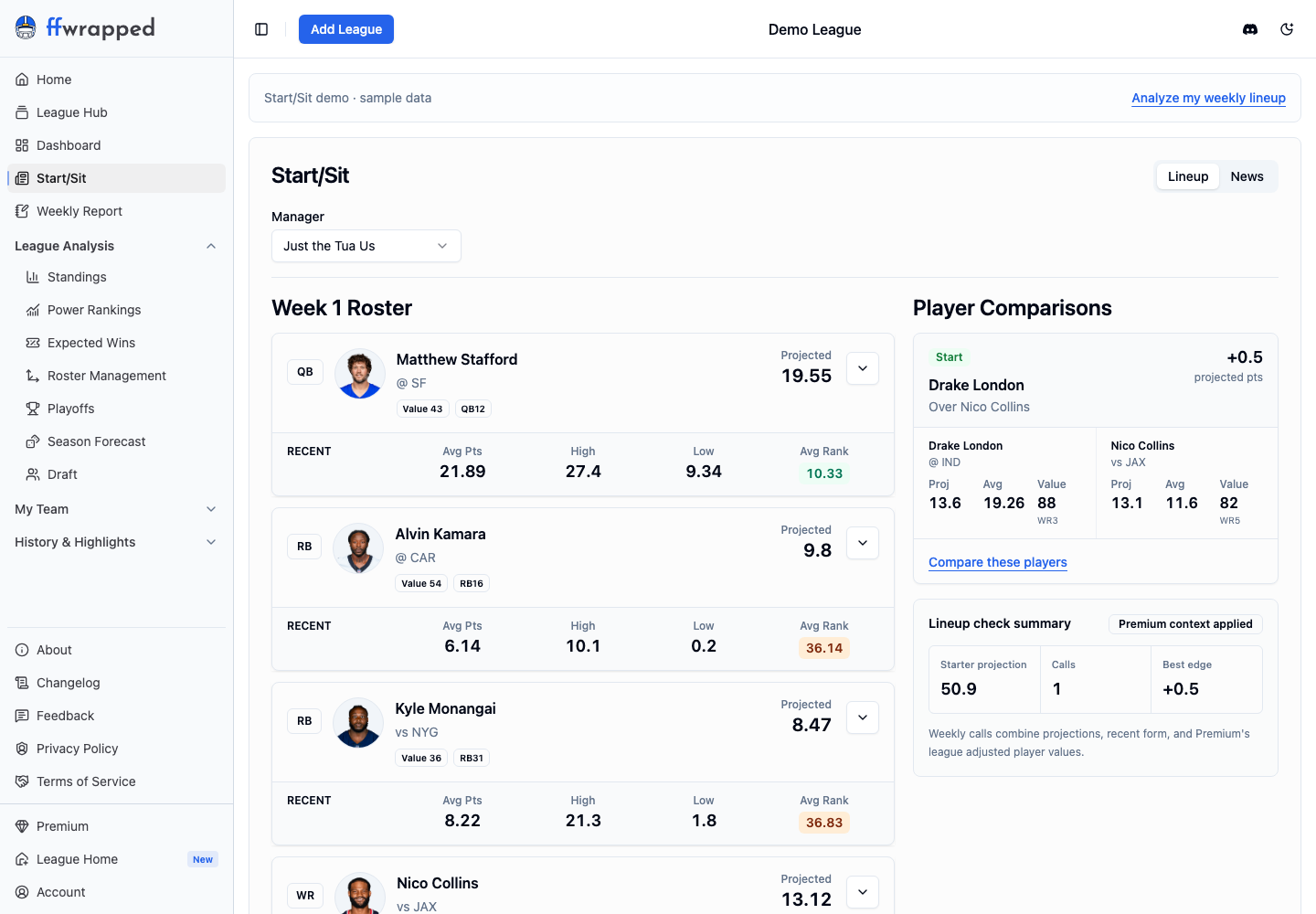
Here's the London and Collins example in the demo, with the edge rounded to +0.5. The player values and positional ranks show the optional Premium context. The week, opponents, and scores are sample data, not current-week advice. Open the full-size screenshot.
If there aren't any suggested swaps, you might already have the stronger projected options starting. There might also be too little data to make a comparison. I'd still scan the roster for missing projections and check the week before calling it done.
5. Save the Close Call and Recheck Before Kickoff
Still torn? Copy the comparison link or download an image and send it to your league chat. Include the week and scoring format so everyone is looking at the same decision. If you reopen that link next week, check the selected week before using it again.
After the games, lineup efficiency can show how many points a different legal lineup would have scored. I'd use that to revisit a close call, but I wouldn't judge the decision only by the result. Sometimes the bench player has the better day even when your original reasoning made sense.
Start/Sit Questions
Can I compare players without importing my league?
Yes. Free Player comparison lets you choose any two supported players without an account or league import. Use the lineup analyzer when you want to review your imported starters and bench together.
Is this the same as rating my fantasy team?
No. Rate My Team compares your overall roster with the rest of your league. Start/Sit focuses on the upcoming lineup decisions supported by the available weekly data.
Should I always start the player with the higher projection?
Use the projection as a starting point, especially when the difference is small. Check the scoring settings, eligibility, availability, and recent context before making the final call. The higher-projected player is not guaranteed to score more.
Can I use ffwrapped to change my Sleeper, ESPN, or Yahoo lineup?
ffwrapped shows the analysis. You make the actual lineup changes in Sleeper, ESPN, or Yahoo.
Check your weekly lineup → Start with the one decision you're least sure about. If you've already got the two names, compare them without importing your league.